Step 1:
Load up the Inventry Console for the needed site, eg GY or L6 & sign in with your login details
Step 2:
Go to Personnel at the top :

Step 3:
Next to go Records on Left side:

Step 4:
Click Add new record to create a new user account:

Step 5:
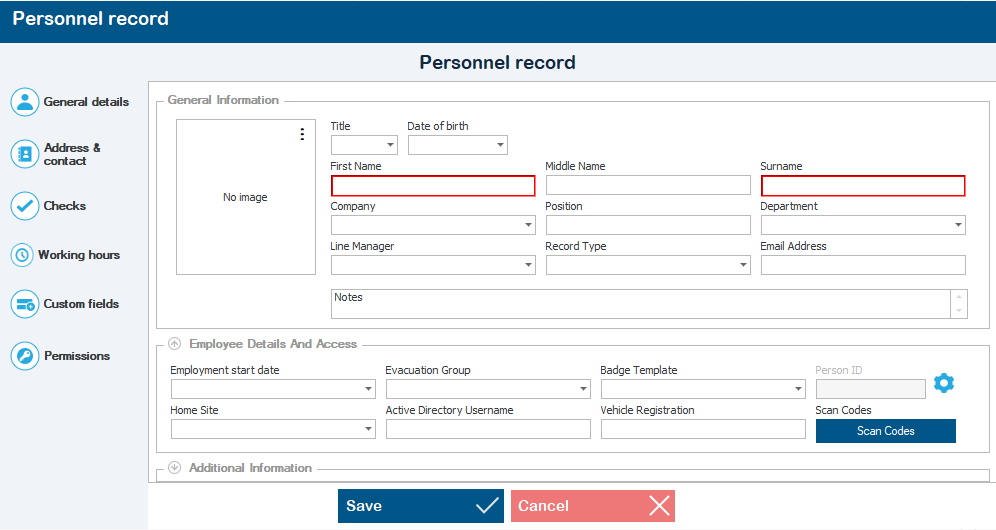
Under the General details section, enter the staff members First name, Surname & email address
Step 6:
Now go to the Additional Information dropdown & set the following:
Record Enabled - Yes
Member of Staff - Yes
Step 7:
Go to the Permissions section & set the following:
Console access - yes
Allow access to visitor module - yes
Step 8:
Still under the Permissions section, get the staff member to set a password.*
*Note - not sure if theres a password policy on it, but tell them it's the same password policy as their main accounts, just to stop them setting a really easy password.
Now the account has been created & the staff member can log in.
Was this article helpful?
That’s Great!
Thank you for your feedback
Sorry! We couldn't be helpful
Thank you for your feedback
Feedback sent
We appreciate your effort and will try to fix the article